Students and PhD students who do not yet have their own AGH University email account can create one using a self-service form. To fill it out, you will need:
- a Student ID Number,
- a PESEL number,
- access to the e-mail box indicated in the admission process.
Please note
If you do not have a PESEL number, you need to enter your date of birth in the YYMMDD format followed by five zeroes. For example, if you were born on the 25th of June 2001, your PESEL number is 01062500000. If the system detects this data as incorrect, it might be necessary to add the number “20” to your birth month, e.g. instead of 01062500000, enter 01262500000.
-
Enter your student ID number and your PESEL number (if you do not have one, please see the information in the box above) into the designated fields and press "Submit".

- After verifying the submitted data, the system will send an activation code to the e-mail address indicated in the admission process. The message should arrive within an hour of submitting the application (usually after a few minutes). If you do not see it in your inbox, make sure to check the spam/junk folder. To check the current status of the order, refresh the page and log in again, providing the same ID number and PESEL number.
Please note
After five incorrect registration attempts, the system will block the possibility of further attempts for a given ID card number.
In case of issues with the form, please contact the IT Helpdesk by writing an e-mail to pomoc-it@agh.edu.pl. Please include your name, surname, and Student ID number in the message, which must be sent from the e-mail address you provided during the admission process.
Please note
You can enable the option to quickly and easily reset your password using your private e-mail address, eliminating the need to visit the IT Helpdesk office in person if you ever happen to forget your password. More information on how to do that can be found below.
-
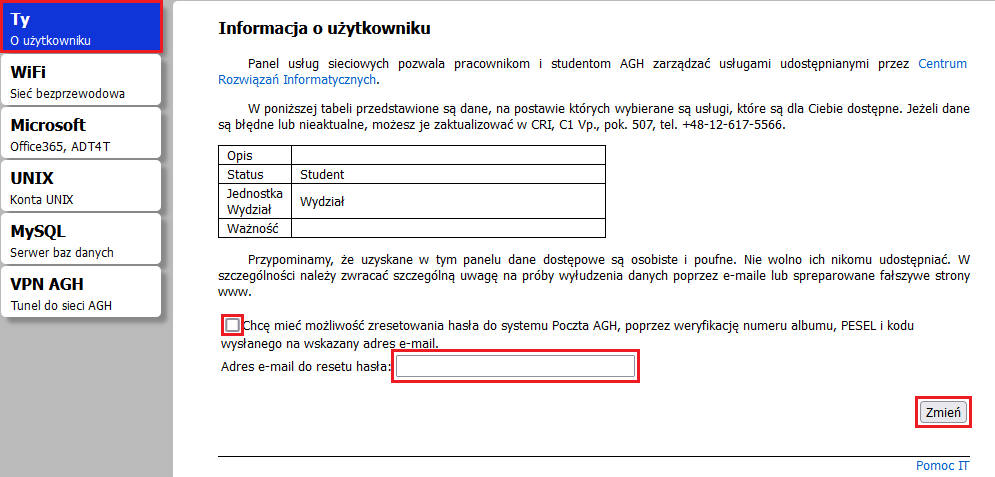
Log into the AGH Panel and click on the "Ty" (eng. "You") tab.
-
Tick the box next to "Chcę mieć możliwość zresetowania hasła do systemu Poczta AGH, poprzez weryfikację numeru albumu, PESEL i kodu wysłanego na wskazany adres e-mail" (eng. "I'd like to enable the option to reset my password to the AGH University mail by verifying my student ID number, PESEL number and authorisation code sent to the specified e-mail address").
-
Enter an alternate e-mail address that you'd like to use for the process of password recovery and click "Zmień" (eng. "Change").
- Confirm the process by entering your PESEL number (if you do not have one, please see the information in the box above) and pressing "Zapisz" (eng. "Save).


